JavaScript Regex
In JavaScript, Regex stands for regular expressions, and it can be referred to as regex, or RegExp. Regular expressions are a sequence of alphabetic, numeric, and special characters that match a string format. Other languages such as Python, C#, Perl, and PHP also support regular expressions. Regular expressions often make use of a special set of characters called metacharacters and quantifiers.
Regular expressions are essential for search-based operations and are supported by the following tools:
- IDEs
- Browser Developer Tools
- Regex Testers
- Database tools
Regular expressions found widespread use in web development and data processing during the rise of the internet in the 1990s. They have become an essential component of most scripting languages, providing developers with powerful tools for text processing, form validation, and data extraction from web pages. In JavaScript, we use the RegExp constructor which was introduced in 1999 when ECMAScript was released. ECMAScript is a standard that ensures that web pages are interoperable across different web browsers.
People in the 90s using dial-up internet:
The RegExp constructor gives JavaScript developers the ability to write regular expressions directly in their code with no need for external libraries. There are, however, tools and libraries for working with regular expressions such as the Perl Compatible Regular Expressions (PCRE) library. IDEs such as VS Code also now include search features based on regular expressions which simplify finding text in source code. The introduction of regular expressions has improved our text processing and pattern-matching abilities. Regular expressions are essential for the following.
- Syntax Highlighting : This helps developers to distinguish between different parts of a code base within a specific programming language.
- Form Validation : Most modern websites make use of regular expressions to ensure that user input is formatted correctly. For example, on a websites registration page.
- String Matching : Searching for keywords, validating input against patterns, or filtering data.
- Password Strength Validation : Regular expressions are an essential security feature for websites and applications in enhancing password strength.
- Text Search and Manipulation : People who work with data mining, log analysis, and text processing benefit massively from this.
- Validating URLs and URIs : Developers can define regular expression patterns that check parts of a web link such as the domain name.
- Search and Replace in IDEs : Regular expressions simplify the process of manually scrolling through large code bases to make changes by allowing developers to make multiple changes in one step.
- Data Extraction and Scraping : Developers can define patterns to match the specific data they would like to extract from unstructured and structured data.
Example of a regular expression:
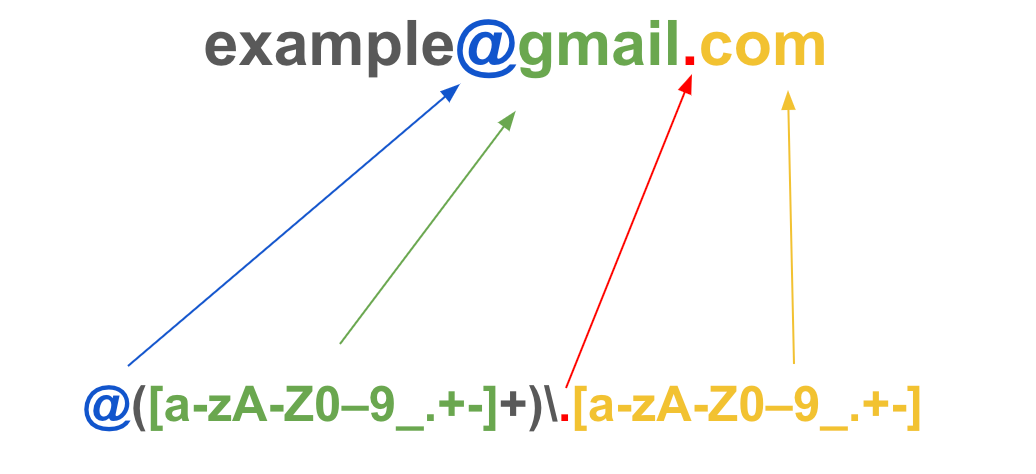
Writing Regular Expressions
In JavaScript, we create regular expressions using the RegExp constructor or with regex literal syntax. To create a regular expression with the regex literal syntax, we need to write our pattern between two forward slashes as shown below.
let pattern = /(?:)/; // regex literal syntax
console.log(expression);

To apply a flag to our pattern, we can write it after the last forward slash. The code snippet below demonstrates how we would use the global flag (g).
let pattern = /(?:)/g; // regex literal syntax with a global (g) flag
console.log(expression);
Flags
Now would be a good time to spin off and talk about flags🚩. These are special characters you can place within a regular expression to specify the matched case. By convention, flags are always placed at the end of the regex pattern. The table below explains how some flags work.
| Flag Name | Character | Description | Example |
|---|---|---|---|
| Unicode Flag | u |
Enables full Unicode matching e.g. emojis | let pattern = /\u{1F602}/ |
| Global Flag | g |
This flag returns all occurrences that match the pattern | let pattern = /word/g |
| Sticky Flag | y |
Limits the match to the current position in the string | let pattern = /word/y |
| Case-insensitive Flag | i |
This flag ignores uppercase or lowercase letters | let pattern = /word/i |
| Multi-line Flag | m |
Tells the regex engine that the test string is more than one line | let pattern = /word/m |
| Single-line Flag | s |
The test string is only one line | let pattern = /word/s |
To create a regular expression with the RegExp constructor, we define a variable the normal way and assign it to the RegExp object using the new keyword as shown below.
let expression = new RegExp();
console.log(expression);
This will output a string that looks like this /(?:)/ to the console. Both ways of creating regular expressions are valid and interchangeable. For example, the two variables below have the same value and will output the same thing.
let pattern_1 = /javascript/g; // regex literal syntax
let pattern_2 = new RegExp("javascript", "g"); // regex constructor

console.log(pattern_1.global);
console.log(pattern_2.global);
In-Built Regex Methods
- We can use the
test()method to return a boolean value after validating a regular expression against a string as shown below.
let expression = /java/i;
let expression2 = /java/;
let testString = "Java is the best!";

console.log(expression.test(testString)); // returns true
console.log(expression2.test(testString)); // returns false
- The
exec()method executes a search for a match in a test string and returns an array containing a piece of detailed information about the first match. If there's no match, it returnsnull.
let expression = /java/i;
let expression2 = /python/i;
let testString = "Java is the best!";

console.log(expression.exec(testString)); // returns an array
console.log(expression2.exec(testString)); // returns null
- The
match()method lets you specify a regex pattern as the parameter, searches through the string you use it against and returns an array containing the substring that matches the regex pattern. The code snippet below demonstrates this.
const name = 'James Bond';
const matchedWord = name.match(/bond/);
const matchedWord2 = name.match(/bond/i);

console.log(matchedWord); // returns null
console.log(matchedWord2); // returns an array
console.log(matchedWord2[0]); // returns the first item in the array which is the pattern match
- The
toString()method converts a regular expression pattern, including any flags to a string.
const expression = /JavaScript/gi;
console.log(expression); // returns a regular expression
const stringVersion = expression.toString(); // converts to a string

console.log(stringVersion); // returns a string
console.log(stringVersion, typeof stringVersion); // returns a string and its data type
The RegExp() constructor has its properties from the prototype🤖 that can be called on the object (__proto__). Some of these properties are methods that check whether a certain flag is used or not. Consider the code snippet below.
const pattern = new RegExp("Coding is fun!", "gi");

console.log(pattern.__proto__); // returns the objects prototype
console.log(pattern.global); // returns true because the 'g' flag exists
console.log(pattern.source); // returns the regular expression
console.log(pattern.flags); // returns the flags used in the regular expression
console.log(pattern.multiline); // returns false because there is no 'm' flag
console.log(pattern.ignoreCase); // returns true because the 'i' flag exists
console.log(pattern.dotAll); // returns false
console.log(pattern.sticky); // returns false because there is no 'y' flag
console.log(pattern.unicode); // returns false because there is no 'u' flag
Several methods are eligible to be called on the RegExp constructor, the rest of them are listed below.
- The
search()method. - The
matchAll()method. - The
replace()method. - The
replaceAll()method. - The
split()method. - The
split()method.
You can see all the methods of any JavaScript object by calling the
__proto__method on it.
Matching Characters
Regular expressions allow us to write patterns for matching some text exactly as it is written. The code snippet below demonstrates this.
const testString = 'Space Jam';
const regex1 = /Space Jam/; // case sensitive pattern
const regex2 = /spAce JaM/i; // case insensitive pattern

console.log(regex1.test(testString)); // true
console.log(regex2.test(testString)); // true
We can also use regular expressions to match numbers or digits.
const phone = 0236589745;
const pattern = /8/;
const pattern2 = /1/;

console.log(pattern.test(phone)); // true
console.log(pattern2.test(phone)); // false
Character Sets
Character sets allow you to specify a range of characters, individual characters, or a combination of both. A character set is a group of characters enclosed in between square brackets ([ ]). The examples below show use cases for popular character sets in regular expressions. Let's explore how we would use each of these character sets in a practical setting.
| Character Set | Description |
|---|---|
[abc] |
Matches either a, b, or c |
The code snippet below shows us how we can use the abc character set.
const pattern = /[abc]/;
const testString = 'The quick big brown fox jumped over the lazy dog';
const testString2 = 'X is the new site';

console.log(pattern.test(testString)); //true
console.log(pattern.test(testString2)); //false
| Character Set | Description |
|---|---|
[aeiou] |
Matches any of the five vowels |
The code snippet below shows us how we can use the vowels character set.
const pattern = /[aeiou]/;
const vowelsString = 'Vowels make the world go around';
const noVowels = 'Shy rhythms cry';

console.log(pattern.test(vowelsString)); //true
console.log(pattern.test(noVowels)); //false
| Character Set | Description |
|---|---|
[a-z] |
Matches any lowercase letter from a to z |
The code snippet below shows us how we can use the lowercase character set.
const pattern = /[a‐Z]/;
const testString = 'I CAN SEE CLEARLY NOW THE RAIN IS GONE';
const testString2 = 'I can see clearly now the rain is gone';

console.log(pattern.test(testString)); //false
console.log(pattern.test(testString2)); //true
| Character Set | Description |
|---|---|
[A-Z] |
Matches any uppercase letter from a to z |
The code snippet below shows us how we can use the uppercase character set.
const pattern = /[A‐Z]/;
const testString = 'THE QUICK BROWN FOX JUMPED OVER THE LAZY DOG';
const testString2 = 'the quick brown fox jumped over the lazy dog';

console.log(pattern.test(testString)); //true
console.log(pattern.test(testString2)); //false
| Character Set | Description |
|---|---|
[0-9] |
Matches any digit from 0 to 9 |
The code snippet below shows us how we can use the number character set.
const pattern = /[0‐9]/;
const sentence = 'The energetic 10 year old boy';
const sentence2 = 'The old man fell asleep';

console.log(pattern.test(sentence)); //true
console.log(pattern.test(sentence2)); //false
Metacharacters
What is a metacharacter🤔? It is a character or symbol that has a special function in a regular expression pattern🗝️. These special characters help us to construct better regular expressions.
| Metacharacter | Symbol | Description | Example |
|---|---|---|---|
| Word Metacharacter | \w |
Represents every alphanumeric character (a to z and 0 to 9), and the underscore symbol (_) | let pattern = /\w/g |
| Non-word Metacharacter | \W |
Matches only spaces, punctuation marks, and symbols excluding alphanumeric characters | let pattern = /\W/g |
| Caret Metacharacter | ^ |
Returns true if the first word in a string matches the pattern | let pattern = /^basketball/ |
| Dollar Sign | $ |
Returns true only if the last word in a string matches the pattern | let basketball = /basketball$/ |
| Digit Metacharacter | \d |
Matches a string that includes all numbers that have 0 - 9 | let pattern = /\d/g; |
| Non-digit Metacharacter | \D |
Matches all characters that are not numeric such as letters and spaces. | let pattern = /\D/g; |
| Square Brackets | [] |
Used for specifying a character class, or character set | let pattern = /[‐^]/g |
| Word Boundary | \b |
Used to match a certain word, character, or letter in a string. | let pattern = /\bsoccer\b/; |
| None-word Boundary | \B |
Used to match a certain word, character, or letter in a string including in-between words | let patter = /\Bthing\B/; |
| Parenthesis | () |
Used to create grouping and capturing | let pattern = /[a-z](\1)/; |
| Space Metacharacter | \s |
Used to match a space in a string including tabs, carriage returns, and new lines | let pattern = /\s/g; |
| Non-space Metacharacter | \S |
Used to match all characters that do not meet the criteria to be a space | let pattern = /\S/g; |
| Pipe MetaCharacter | (|) |
Used to specify multiple alternatives for matching. It functions like the word 'or' | let pattern = /shoe|sneaker/; |

Conclusion
As you can see, there is a lot that we can do with regular expressions. In this article, we have learnt about different ways of referring to and writing regular expressions✍️, using flags🚩, in-built methods, metacharacters, and matching characters. The great thing is that you are free to experiment🧪 with regular expressions and discover what else they can do. Here is a hint🧩, define a variable that is equal to the RegExp constructor and output it to the console using the __proto__ method. This will return an object that shows all the methods and properties that the RegExp object provides.
This is just the tip of the iceberg🧊 when it comes to regular expressions in JavaScript. I challenge and encourage you to do some further research on the following topics:
- What are Quantifiers?
- Using Quantifiers to match repeated characters.
- Grouping and capturing
- Specifying matches with the Curly Braces Metacharacter.
- The Wildcard Metacharacter.
- Lookaheads and lookbehinds

I hope you enjoyed reading this article. Feel free to share some feedback using the contact form 📞of this website. If this was your first time discovering regular expressions, then congratulations on a major milestone!

Happy coding!🤙